 José Levelink
Updated :
José Levelink
Updated :

Scroll down the Information tab to Mobilised loans.
Click on the +. A pop-up appears.
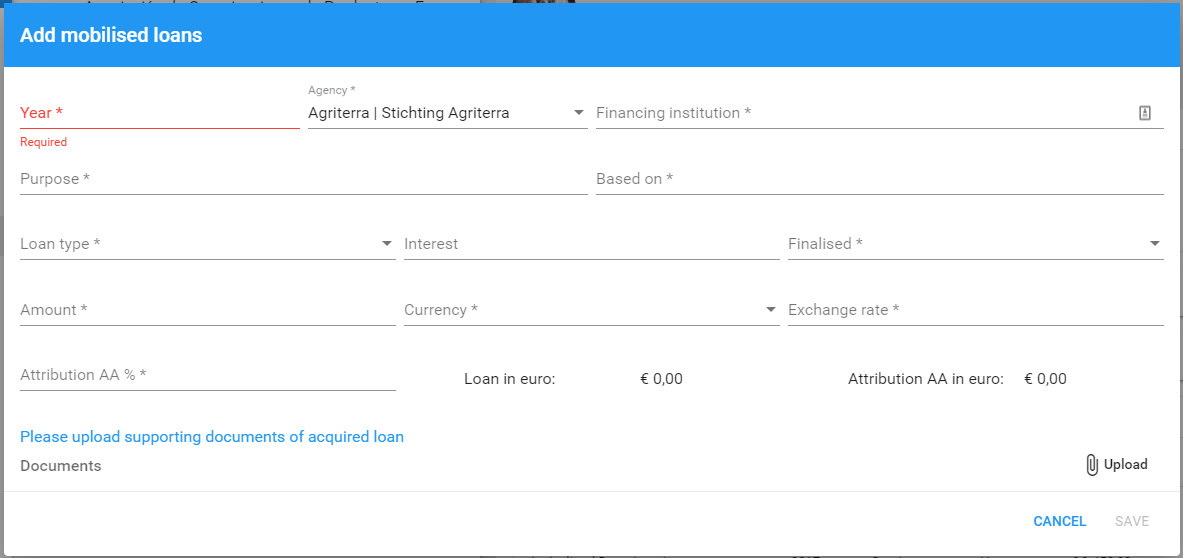
Mandatory fields (*) are: Year, financing institution (issuing the loan), purpose (of the loan), based on, choose a Loan type (Working capital or Investment of Grant), finalised (has the transaction been finalised yes/no/unknown), amount (in local currency), choose the Currency (Eruo, USD or other currency), add the Exchange rate, and fill in the % Attribution to the agri-agency.
A document can be uploaded that proofs the issuing of the loan.
| FIELD | EXAMPLES |
| Purpose | i.e. provide technical extension / to invest in milk collection centre / capital for commercial expansion |
| Based on | Strategic plan / business plan |
| Loan type | Working capital / Investment / Grant |
| Interest | the interest paid by the organisaiton for the loan |
| Finalised | yes - the amount has been issued; no - the amount has not yet been issued; unknown |
| Attribution AA % | The percentage of the total amount that can be attributed to the work of the business advisor. |